

← Product overview
Healthcare IntegrationContact sales

HL7 Edge Gateway

Connect HL7 v2 systems such as MEDITECH to APIs, message brokers, files, FHIR servers and payer networks. Route, filter and transform each feed, with pass-through or durable store-and-forward delivery, an admin console and clustered operation.

Supports HL7 v2, FHIR R4 and X12 EDI over MLLP/MLLPS, REST, SOAP, Azure Service Bus, SFTP and CAQH CORE

Downloads require a free Lambogenius account. Purchase availability is confirmed at checkout.

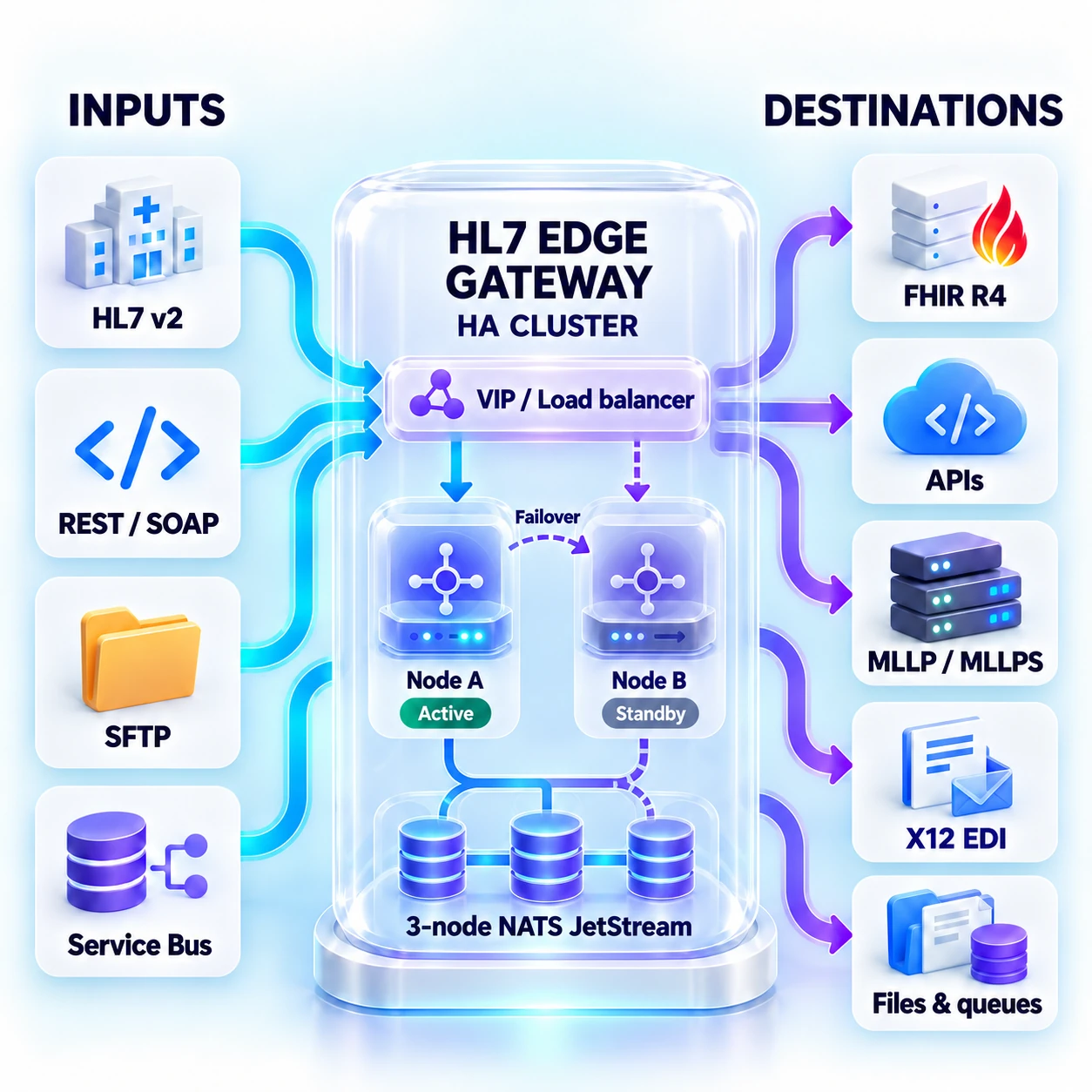
HL7 v2, REST/SOAP, SFTP and Service Bus feed an HL7 Edge Gateway HA cluster with active and standby nodes, failover and three NATS JetStream nodes, delivering to FHIR R4, APIs, MLLP/MLLPS, X12 EDI, files and queues.
HA example: two gateway nodes with failover and a three-node NATS JetStream cluster. HA setup guide · View full-size diagram ↗

Keeps the interface moving

Store and forward, in order, across a cluster.

Store-and-forward routes acknowledge a message after durable storage, then deliver queued messages in order with retries. NATS JetStream provides replicated queues for multiple gateway nodes. Delivery is at-least-once: a crash after a destination accepts a message can cause redelivery, so destinations should handle retries idempotently.

  • With the replicated JetStream store, AA follows quorum persistence; ordered queues coordinate delivery across gateway nodes.
  • Block a route on a rejection to keep ADT strictly ordered, or park rejected ORUs in dead letters and carry on.
  • A configurable deduplication window suppresses repeated HL7 control IDs; downstream systems still need to handle possible redelivery.

What it helps you do

Connect clinical systems, cloud services and payer networks.

  • Bring together MLLP/MLLPS, REST, SOAP, Azure Service Bus and SFTP, with multiple sources and independently queued destinations per route.
  • Filter and transform messages for each destination, convert supported HL7 v2 messages to FHIR R4, and exchange X12 EDI through files, APIs, Service Bus or CAQH CORE.
  • Manage delivery, access, audit trails, encrypted message storage and cluster health from the gateway console and operations APIs.

Gateway capabilities

Connect, transform and operate your interfaces.

Use the standalone gateway alongside your clinical systems and cloud services. Each route defines its sources, destinations, message handling and delivery mode.

Sources and destinations

ProtocolReceiveSend
MLLP / MLLPSReceive HL7 on a TCP or TLS listener and return an ACK.Send over a persistent connection and process the receiver’s ACK.
REST over HTTP(S)Expose POST endpoints with HL7 or JSON acknowledgements.POST messages to APIs with destination-specific headers and authentication.
SOAP 1.1 / 1.2Receive messages inside SOAP envelopes.Build SOAP requests from templates and classify SOAP faults.
Azure Service BusConsume a queue or topic subscription, with completion, redelivery and dead-letter handling.Publish to queues or topics with message identifiers for duplicate detection.
SFTPPoll finished files, read messages or HL7 batches, and move, rename or delete processed files.Write individual messages or batches, using temporary files and rename on completion.
FHIR R4Use an HL7 source with a FHIR transform.Submit transaction Bundles and inspect each response entry and OperationOutcome.
CAQH CORE / X12Poll a payer or clearinghouse for batch results and acknowledge received interchanges.Submit real-time requests or queued batches to CORE servers.

One feed, multiple systems

  • Combine several sources on a route and give each destination its own queue, so an unavailable destination does not hold up the others.
  • Filter by message type, segment fields, repeated segments or an OBR/OBX group, with any/not combinations.
  • In pass-through mode, use the primary destination’s answer and copy accepted messages to the other destinations. Test filters in the console or CLI.
Explore routing and destinations →

A different message for each destination

  • Set, copy, move, clear and map fields; add or delete segments; reformat dates, replace text and hash identifiers.
  • Apply conditional rules or iterate over segment groups, then use Liquid templates to produce HL7, JSON, XML or text.
  • Keep the received message in the queue so corrected transforms apply to waiting deliveries. Preview results with the Transform tester and the message viewer’s as-sent view.
Explore message transformations →

HL7 v2 to FHIR R4

  • Convert ADT, ORU, ORM, OML and VXU messages to transaction Bundles for patients, encounters, orders, results, specimens, immunizations and other supported resources.
  • Customize built-in Liquid templates and code tables, with a configured timezone for HL7 timestamps.
  • Use stable resource identifiers and conditional requests to support repeat processing, then send Bundles to a FHIR R4 server and handle its response entry by entry.
Explore FHIR conversion →

X12 EDI and CAQH CORE

  • Exchange HIPAA 5010 transactions including 837P/I/D claims, 835 remittances, 270/271 eligibility, 276/277 claim status, 277CA, 278, 834, 820, 999 and TA1.
  • Validate envelopes, control numbers, loops, required elements and code lists; generate 999/TA1 acknowledgements and forward accepted transaction sets. Re-envelope interchanges, filter loop paths or convert transactions to JSON.
  • Use CORE C4.0.0 SOAP/MTOM or 2.2.0 for real-time and batch exchange, including polling results and returning acknowledgements.
Explore X12 EDI →

Protect connections and stored messages

  • Use TLS 1.2/1.3, mutual TLS and private certificate authorities. Authenticate HTTP callers with OAuth2/OpenID Connect scopes or roles, API keys and IP allowlists.
  • Connect to destinations with OAuth2 client credentials or private_key_jwt, Salesforce connected apps, Entra managed/workload identities or Google service accounts. Pin SFTP host keys.
  • Configure AES-256-GCM encryption for queued and dead-lettered messages, with key rotation and re-encryption. Keep credentials and keys in environment variables or protected files.
Explore security controls →

Operate with accountable access

  • Inspect route state, queues, dead letters, cluster nodes and license status; pause, resume, retry, requeue or remove queued messages as permitted.
  • Use OpenID Connect single sign-on, local users or named API tokens, with viewer, operator, auditor and admin roles. Message-payload access requires a separate grant; sessions support idle and maximum lifetimes.
  • Review hash-chained audit records, filter and export CSV, and send daily audit files to a SIEM. Integrate health, readiness and Prometheus metrics with monitoring.
Explore the admin console →

Choose how each route handles outages

  • Pass-through waits for the destination’s answer. Store-and-forward acknowledges durable storage, then delivers in order with exponential backoff.
  • Choose whether a rejected message blocks later deliveries or moves to dead letters. Configure retry limits and a deduplication window.
  • Use replicated NATS JetStream queues for clustered recovery. At-least-once delivery means destinations must tolerate a retry after an uncertain outcome.
Explore delivery and acknowledgements →

Run at the edge or in your cloud

  • Run a single binary on Windows, Linux or macOS, as an OS service or in a Linux Docker container.
  • Use Helm templates for AKS, EKS and GKE, Bicep for Azure Container Apps, or Terraform for AWS ECS Fargate.
  • Use persistent disk for the embedded store or a durable NATS JetStream cluster. Container Apps and Fargate store-and-forward deployments need JetStream to retain acknowledged messages across replica replacement.
Explore deployment options →