Source estate discovery
Inventory BizTalk solutions and MSI packages, then trace applications, bindings, orchestrations, schemas, maps, pipelines, endpoints, and custom-code dependencies back to source evidence.


LambOGenius Integration Migration discovers existing behavior, designs an Azure Integration Services target, generates a migration candidate, validates it, and prepares an auditable deployment package.
One governed workflow
Each stage persists inspectable artifacts. Incomplete or unsupported behavior becomes a gap or review item—it is never silently treated as migrated.
Verify source, toolchain, policy, and target prerequisites.
Build an evidence-backed inventory of flows, artifacts, dependencies, and gaps.
Design target architecture, action mappings, resources, and workflow dispositions.
Generate a controlled migration candidate in approved write paths.
Run project build, policy, Bicep, and static deployment tests.
Create a manifest-backed deployment package with checksums and provenance.
What the tool does
Inventory BizTalk solutions and MSI packages, then trace applications, bindings, orchestrations, schemas, maps, pipelines, endpoints, and custom-code dependencies back to source evidence.
Scan nested solutions and projects without AI, package restore, or source changes. Missing, external, dynamic, ambiguous, and relocated references remain explicit for review.
Translate verified source behavior into target architecture, action mappings, resource selections, workflow designs, gaps, and documented human decisions.
Generate Logic Apps Standard workflows, supporting Functions, infrastructure, tests, and pipeline assets only inside approved repositories and write paths.
Build generated projects and check policy, naming, prohibited resources, Bicep, and static deployment structure before a candidate can be packaged.
Process one solution or a discovered estate, isolate each generated repository, run bounded parallel work, and resume safely from persisted stage checkpoints.
Use supported agent providers—including hosted coding agents and local Ollama models—while deterministic tools retain control of source facts, validation, and writes.
Produce offline HTML, Markdown, and JSON reports with stage outcomes, timings, token usage, provenance, checksums, cost estimates, and deployment records.
Command-line interface
The route-neutral li command runs individual stages or a resumable, end-to-end estate migration. The same governed workflow works at a terminal, in CI, and behind the VS Code experience.
Discover .sln and .msi inputs recursively, run independent solutions in parallel, and continue after isolated failures.
Persist stage state, reuse completed artifacts, and preflight a resume before invoking an AI provider or writing files.
Use deterministic precheck, policy, build, Bicep, and static deployment checks with machine-readable exit states.
Create a deployment bundle with application source, infrastructure, pipelines, environment parameters, manifests, and SHA-256 hashes.
Estimate Azure retail cost, then explicitly queue an existing Azure DevOps pipeline without bypassing its approvals.
Consume JSON output and JSON Lines run events for status, policy, cost, package, and deployment automation.
li dependencies --source ./biztalk --output ./reports/dependencies
li config check --config migration.config.yaml
li precheck --config migration.config.yaml
li convert --config migration.config.yaml --batch --resume
li status --config migration.config.yaml --json
li package-deployment --config migration.config.yaml
li estimate-cost --config migration.config.yamlMigration Studio for VS Code
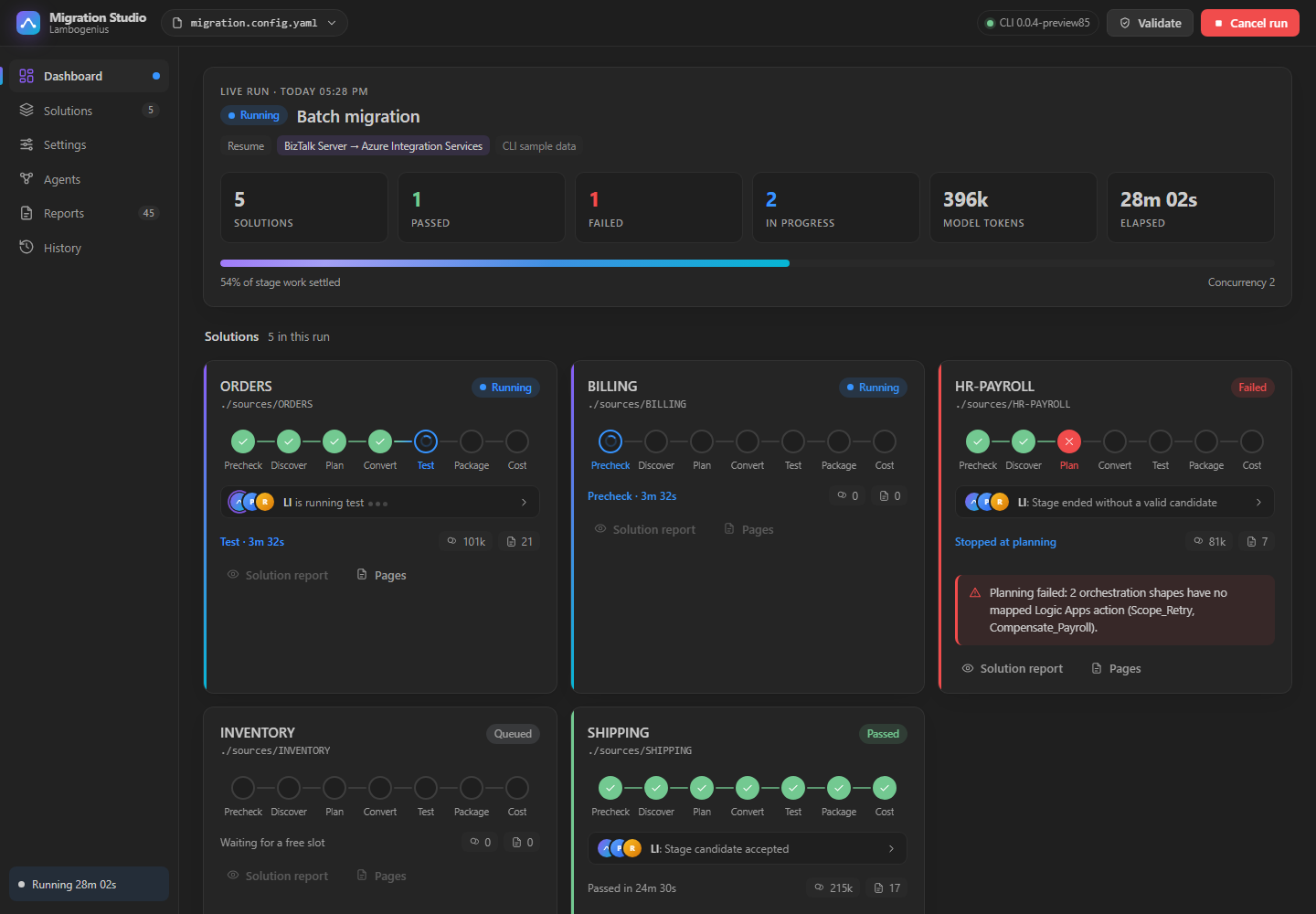
Migration Studio is the visual front end for the same li workflow. Configure a batch, start or cancel runs, and watch every solution move through its governed stages while the CLI remains the execution and audit authority.
Safety by design
Current release boundary
The current compatibility implementation is focused on BizTalk sources and Azure Integration Services, including Logic Apps Standard. Broader MuleSoft, TIBCO, healthcare, AWS, and Google Cloud routes remain planned and are not presented as supported capabilities.
Explore the workflow